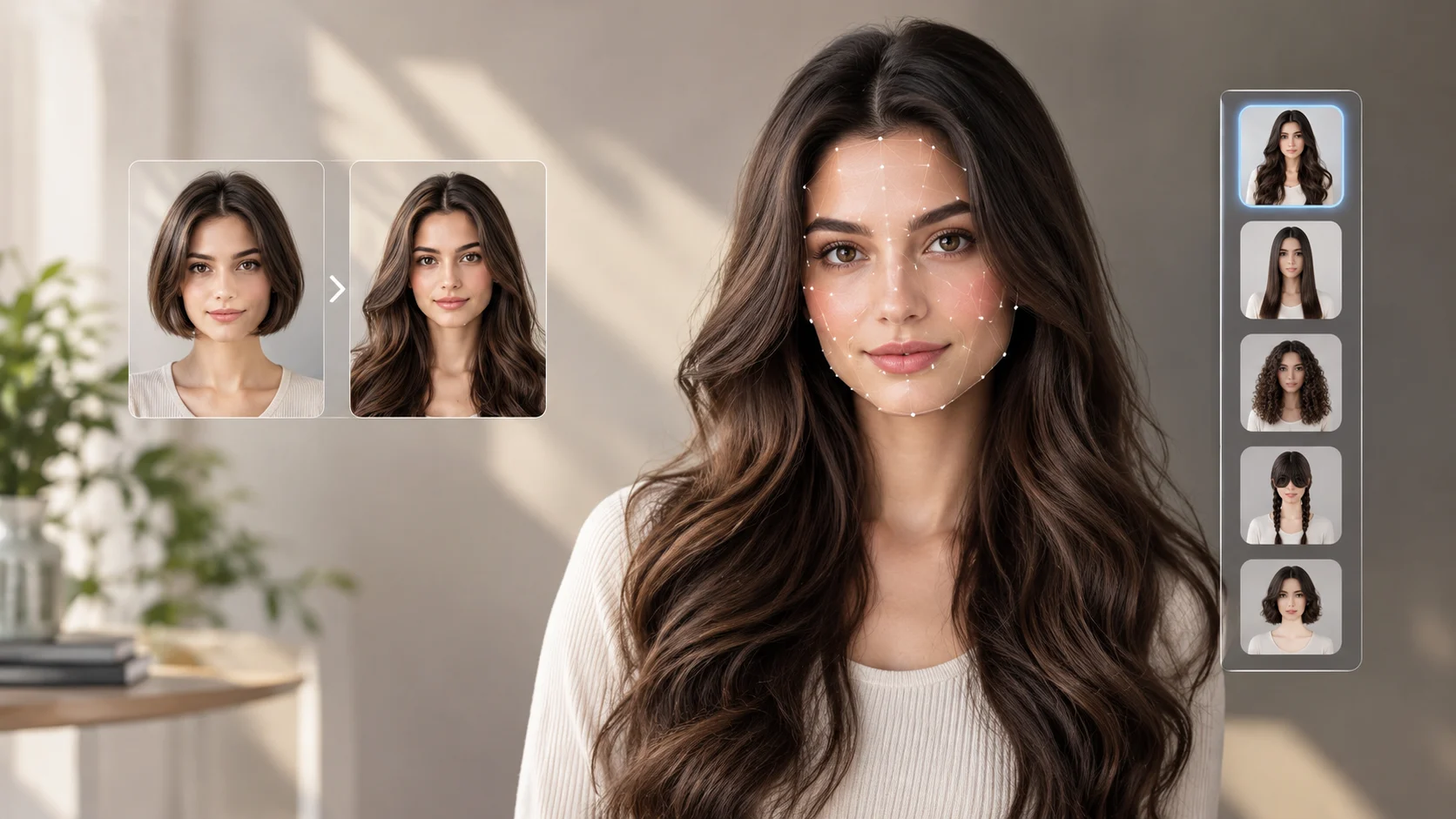
LongHair AI is an online AI hairstyle tool that lets you preview long hairstyles using your own photo. It helps you explore different lengths, textures, layers, and looks before visiting a salon or growing your hair. The platform also offers hairstyle inspiration, hair color tools, and long hair care guides.
LongHair AI at a Glance
- Main purpose: Preview long hairstyles on a personal photo using AI.
- How it works: Upload a photo, choose a hairstyle category, generate a preview, and review the result.
- Available styles: The interface includes long, straight, curly, braided, layered, and other hairstyle categories.
- Additional features: The website also lists hair color changing, facial analysis, and hairstyle inspiration resources.
- Cost: The website advertises free usage options, but the exact credit limits and any paid upgrades should be checked before use.
- Best for: Anyone who wants to experiment with a new hairstyle digitally before making a real-world change.
What Is LongHair AI?
LongHair AI is a browser-based hairstyle visualization tool available through LongHair.ai. It allows users to upload a photo and generate a visual preview of themselves with different hairstyles, particularly long hair.
Instead of relying entirely on reference pictures of models or celebrities, you can explore how a hairstyle might look on your own face. This can make it easier to compare different lengths and styling options.
The website combines its AI hairstyle changer with hair inspiration galleries, care guides, trend articles, and other appearance-editing tools. Its long hair filter is designed for people interested in experimenting with hairstyles without physically changing their hair first.
Importantly, LongHair AI changes the appearance of a photo. It does not physically grow hair, improve hair health, or guarantee that a particular style will suit you in real life.
How Does LongHair AI Work?
AI hairstyle tools generally use computer vision and image-generation techniques to analyze an image and create a modified version. The specific underlying model and technical architecture used by LongHair AI are not clearly established by the public product information reviewed for this article.
The process is straightforward for most users.
1. Upload Your Photo
Visit the LongHair AI hairstyle filter and upload a suitable image.
The website lists support for JPG, JPEG, PNG, and WebP images, with a maximum upload size of 20 MB. A clear, front-facing photograph is a sensible starting point.
For a better preview, choose an image with good lighting, visible facial features, and minimal obstruction around your head.
2. Choose a Hairstyle
Explore the available categories and select the look you want to test. The interface includes options such as long, curly, straight, braids, bangs, and other styles.
You can use these options to compare different visual directions, from sleek, straight hair to softer waves or more textured looks.
Availability may vary by feature or generation workflow, so check the current interface for the exact styles offered.
3. Generate Your Hairstyle Preview
Start the generation process and let the tool create an edited image. The goal is to show how your appearance might change with the selected hairstyle.
Review the result carefully. Pay attention to the hairline, volume, length, facial proportions, and how the new hair blends into the original photograph.
4. Compare and Save Your Favorite Look
If the tool provides the necessary options, save or download your preferred result for later reference.
You can compare several previews and use them as inspiration when discussing a haircut, extensions, or styling options with a professional.
Remember that an AI-generated image is a visualization, not a precise prediction of how your hair will behave in everyday conditions.
Key Features of LongHair AI
LongHair AI offers several features for users interested in hairstyle experimentation and beauty inspiration.
AI Long Hair Filter
The long hair filter is the platform’s central feature for this use case. It lets users preview long hairstyles on an uploaded photo rather than manually editing individual strands.
This is particularly useful if you currently have short or medium-length hair and want to explore a longer appearance.
Multiple Hairstyle Categories
The tool’s interface includes several categories for exploring different looks. These include straight hair, curly hair, long hairstyles, braids, bangs, and other options.
Different categories make it easier to explore alternatives without starting the entire process from scratch each time.
Hair Color Changer
The website also lists an AI hair color changer. This feature is intended to help users visualize alternative hair colors before considering a real dye job.
For example, you might want to compare a darker brunette shade with a warmer brown or a lighter color. Generated results can help communicate your preferences, although actual dye results depend on your existing hair color and condition.
Facial Analysis and Hairstyle Inspiration
LongHair AI also promotes facial analysis and hairstyle inspiration resources.
These features may help you explore looks that complement your preferences and facial features. However, AI-generated suggestions should be treated as starting points rather than definitive beauty assessments.
A professional stylist can also account for hair density, natural growth patterns, maintenance requirements, and your personal routine.
Long Hair Care Guides
The website includes articles covering long hair care, detangling, hairstyles, growth-related topics, and current trends.
These resources provide context beyond the image generator. If you are planning to grow your hair, practical guidance on reducing breakage and maintaining healthy ends can be more useful than visualization alone.
Benefits of Using LongHair AI
Preview a New Look Before Visiting a Salon
A hairstyle can look appealing in a reference photograph but different on another person. Previewing it on your own photo gives you another perspective before making a decision.
You can also show the result to a stylist and explain which details you like.
Experiment Without Cutting or Growing Your Hair
Growing hair takes time, while a major haircut can be difficult to reverse quickly. A virtual hairstyle preview lets you explore alternatives without making an immediate physical commitment.
This can be useful when deciding whether to grow out a short haircut, consider extensions, or try a different length.
Explore Styles More Efficiently
Comparing several hairstyle references individually can be time-consuming. An AI hairstyle changer offers a convenient way to test different visual directions using one photograph.
The quality of the comparison still depends on the generated images and the available style options.
Find Inspiration for Social Media and Creative Projects
Content creators can use hairstyle previews as inspiration for beauty posts, style comparisons, or personal makeover concepts.
If you publish generated images, avoid presenting an AI transformation as an authentic photograph of a real haircut when that distinction matters to your audience.
How to Get Better Results With LongHair AI
The quality of a virtual makeover depends partly on the input photograph. Follow these practical tips to improve your results.
- Use clear lighting: Natural, even lighting helps preserve facial details.
- Choose a front-facing image: A straight-on view provides a useful starting point for comparing hairstyles.
- Keep your face visible: Avoid sunglasses, heavy shadows, and objects covering your facial features.
- Try different textures: Compare straight, wavy, and curly styles instead of assuming one will look best.
- Test different lengths: Shoulder-length, chest-length, and longer styles can create very different visual proportions.
- Compare several outputs: One generated image may contain artifacts or an awkward hairline.
- Use the result as a reference: Take your favorite preview to a stylist and discuss what is realistically achievable.
If the output looks unnatural, try another photograph with a simpler background and better lighting.
Is LongHair AI Free to Use?
LongHair AI advertises free usage options on its website. Its hairstyle filter also displays a prompt to claim free credits.
However, free access does not necessarily mean unlimited generations or unrestricted downloads. The exact credit allowance, renewal rules, paid features, and any upgrade costs should be checked on the live website before you begin.
The publicly accessible pricing page did not provide enough clear information to establish a reliable current price list. Therefore, it would be misleading to promise unlimited free use or quote a specific subscription price.
Before paying for an upgrade, check:
- How many free generations are included.
- Whether additional credits cost money.
- Whether credits expire.
- Whether high-resolution downloads require payment.
- Whether subscriptions renew automatically.
- What cancellation and refund conditions apply.
You can start at LongHair.ai and review the current terms presented during use.
LongHair AI Limitations You Should Know
Although AI hairstyle tools are convenient, they have limitations that matter when choosing a real hairstyle.
Generated Images May Not Look Completely Natural
AI-generated hair can sometimes appear too smooth, unusually thick, or poorly blended around the ears and hairline.
The result may also contain inconsistencies in lighting, strand direction, or the way hair falls over clothing.
For this reason, compare the overall shape of the hairstyle rather than judging the result solely by its polished appearance.
The Preview Cannot Predict Real Hair Behavior
Your actual hair texture, density, growth pattern, and styling routine affect the final look. An AI image cannot reliably account for every one of these factors.
A hairstyle that looks excellent in a generated image may require different products, daily styling, or professional techniques in real life.
Feature and Pricing Details Can Change
The available styles, free credits, download options, and interface may change over time.
Do not assume that a feature advertised in an older review remains available under the same conditions. Check the official website before relying on a particular capability.
Privacy Requires Attention
Uploading a personal photo involves sharing an image with an online service. Before uploading, read the platform’s current privacy policy and understand how it handles uploaded images, generated outputs, storage, and deletion requests.
The website makes privacy-related statements in its product content, but those statements should not be treated as independently audited guarantees. If you are uploading a sensitive image, verify the current policy and avoid sharing photographs you would not want processed by an external service.
LongHair AI vs. Other Hairstyle Tools
LongHair AI belongs to the broader category of AI hairstyle simulators and virtual beauty tools.
The table below compares it with other types of solutions without assuming that their image quality, privacy practices, or pricing are equivalent.
| Tool or approach | Best suited for | Main advantage | Main consideration |
|---|---|---|---|
| LongHair AI | Exploring long hairstyles | A dedicated long hair filter and related inspiration content | Check current credits, privacy terms, and download limits |
| General AI image editors | More customized hairstyle concepts | Flexible creative editing | Results depend on the editor and prompt |
| Virtual makeover apps | Trying different beauty looks | May combine hairstyles with other appearance features | Availability and pricing vary by app |
| Professional hairstylist | Planning a real haircut | Advice based on your actual hair and preferences | Requires a consultation or appointment |
If your primary goal is to visualize longer hair quickly, a dedicated long hair filter is a logical place to start. If you need detailed control over an image, a general-purpose editor may be worth comparing.
For a real haircut, use digital previews alongside advice from a qualified stylist.
Who Should Use LongHair AI?
LongHair AI may be useful for several groups of people.
People growing their hair: Preview longer styles while deciding which length or shape to aim for.
Anyone considering a haircut: Compare layers, bangs, waves, or other looks before a salon appointment.
People exploring hair colors: Use the site’s listed color-changing feature to develop ideas for a future salon visit.
Beauty enthusiasts and content creators: Create hairstyle concepts and explore different looks for inspiration.
People considering extensions: Visualize a longer appearance before researching the practical cost and maintenance of extensions.
It may be less useful if you need a precise prediction of a professional haircut, a medically reliable hair-growth assessment, or advanced manual control over every part of an image.
Is LongHair AI Worth Trying?
LongHair AI is worth considering if you want a simple way to explore long hairstyles using your own photograph. Its dedicated filter, hairstyle categories, and related inspiration content make it relevant to people planning a visual change.
Its main value is convenience and experimentation, not guaranteed realism or professional hair advice. Before relying on a result, compare multiple previews, check the current access limits, and review the privacy policy.
For the most useful outcome, treat the generated image as a conversation starter with your stylist rather than an exact promise of how a haircut will look.
FAQs
1. What is LongHair AI used for?
LongHair AI is an online hairstyle visualization tool that lets users upload a photo and preview different hairstyles, particularly long hair. The website also offers hair color tools, hairstyle inspiration, and hair care content.
2. Is LongHair AI free?
LongHair AI advertises free usage options and displays a free-credit prompt. However, the exact number of available credits, any usage restrictions, and the cost of optional upgrades should be checked on the official website.
3. How do I use LongHair AI to try long hairstyles?
Visit the LongHair AI filter, upload a clear photo in a supported format, choose a hairstyle category, and generate a preview. Review the result and save it if the current interface provides a download option.
4. Can LongHair AI show me what I would look like with long hair?
Yes. The tool is designed to generate a visual preview of longer hairstyles using your uploaded photo. The result is a digital simulation, so it may not perfectly reproduce your natural hair texture, density, or final styling outcome.
5. Is LongHair AI safe for uploading personal photos?
Before uploading a personal photo, review LongHair AI’s current privacy policy for details about image processing, retention, deletion, and data use. Avoid uploading sensitive images unless you are comfortable with the disclosed practices and terms.
Conclusion
LongHair AI offers a convenient way to experiment with long hairstyles before making a real-world change. Its hairstyle filter, additional beauty tools, and inspiration resources can help users compare looks and prepare for a salon consultation.
For the best experience, start with a clear photo, test multiple styles, and treat each result as a visual reference. Check current pricing, free credit limits, and privacy terms before uploading personal images or paying for additional features.