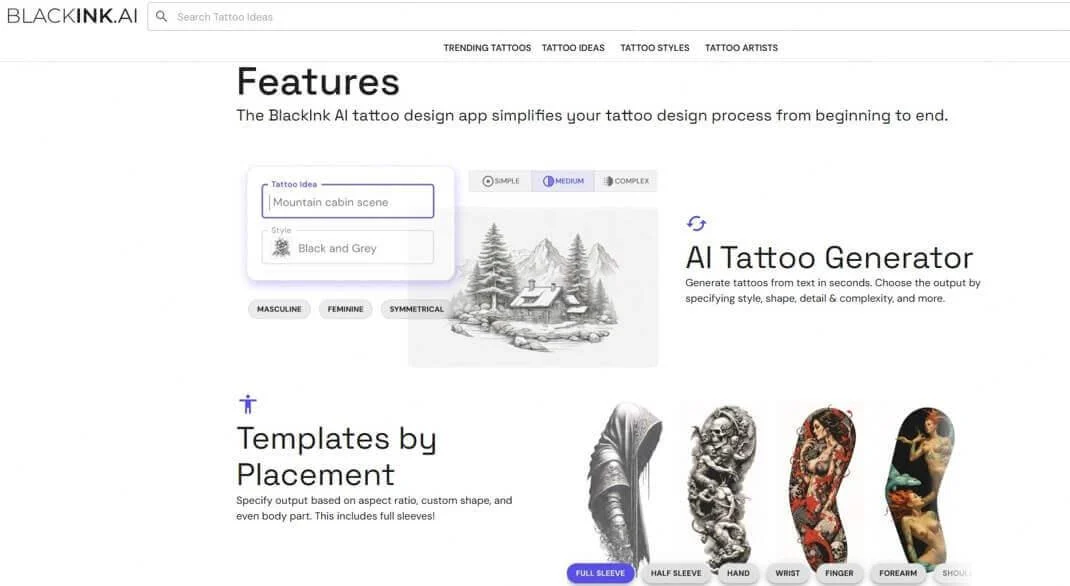
BlackInk AI is an AI-powered tattoo design platform that helps users transform written ideas into personalized tattoo concepts. Instead of spending hours browsing tattoo galleries or trying to explain an unfinished idea to an artist, users can describe their vision, select a tattoo style, and generate custom artwork using artificial intelligence.
The platform is designed for tattoo enthusiasts, beginners, and professional tattoo artists who want to explore creative possibilities before committing to permanent body art. It also offers features such as body-placement previews, stencil conversion, image uploads, and design customization.
As AI-powered creative tools become more accessible in 2026, BlackInk AI represents an interesting development in the intersection of artificial intelligence, digital art, and personal expression.
This guide explores what BlackInk AI is, how it works, its key features, pricing, advantages, limitations, alternatives, and whether it is worth using.
What Is BlackInk AI?
BlackInk – AI-Generated Custom Tattoos in Seconds – Aitoolnet
165+ Flash Sheets Tattoo Ideas – BlackInk AI
Fmf Tattoo Ideas | TattoosAI
BlackInk AI is an online AI tattoo generator that creates customized tattoo artwork from text descriptions and creative preferences.
The platform allows users to explore different tattoo concepts without requiring professional drawing skills. Users can enter an idea, choose a visual style, and generate artwork that can be refined before taking it to a tattoo studio.
For example, someone interested in a lion tattoo could describe a realistic lion surrounded by geometric patterns, with fine-line detailing and a minimalist composition. BlackInk AI can use that description to generate visual concepts.
The platform also provides tools for preparing designs for real-world tattoo applications.
According to its official website, BlackInk AI has generated more than 1.5 million designs and attracted over one million users. These are company-reported figures rather than independently verified statistics. BlackInk AI+1
Official website: Visit BlackInk AI.
How Does BlackInk AI Work?
BlackInk AI uses AI-powered image generation to interpret written descriptions and transform them into tattoo-style artwork.
The process is relatively straightforward and does not require graphic design experience.
Step-by-step: How to use BlackInk AI
- Open the platform: Visit the official BlackInk AI website and access its tattoo generator.
- Describe your tattoo idea: Enter a detailed description of the design you want.
- Choose a tattoo style: Select an appropriate artistic direction, such as blackwork, realism, minimalist, geometric, Japanese, or traditional.
- Generate designs: Let the AI turn your description into visual tattoo concepts.
- Refine your selection: Experiment with different variations, details, complexity, colors, and line weights.
- Preview the placement: Use the available body-placement visualization to understand how the design might look on your skin.
- Download or prepare a stencil: Use the stencil converter and available high-resolution downloads to prepare the concept for professional review.
The important point is that BlackInk AI supports the creative planning process, rather than simply generating generic images. BlackInk AI+2
Key Features of BlackInk AI
BlackInk AI offers several tattoo-specific features that distinguish it from general-purpose AI image generators.
1. AI Tattoo Design Generator
Melhor gerador de tatuagem com IA grátis – crie desenhos
goenhance.ai
The central feature is its AI tattoo generator. Users can describe an idea and receive artwork based on their preferred subject, artistic style, and visual direction.
For example, users can explore:
- Animal-inspired tattoos.
- Floral and botanical designs.
- Geometric patterns.
- Mythological characters.
- Minimalist symbols.
- Personalized lettering.
- Abstract and artistic compositions.
This feature is particularly useful for people who have a concept in mind but struggle to translate it into a visual design.
2. Multiple Tattoo Styles
Blackwork Tattoos: A Timeless Trend — Paper Crane Tattoo Studio
Thin Black Line Tattoos | Gumballs.com
Best Tattoo Studio Reading | StraightLinesTattoo
Different tattoo styles communicate different artistic ideas. BlackInk AI provides options that help users experiment with various visual approaches.
Some supported styles include:
- Blackwork
- Black and grey
- Minimalist
- Neo-traditional
- Realism
- Japanese
- Geometric
- Dotwork
- Tribal
- Watercolor
- Gothic
- Chicano
- Surrealism
- Sketch
The platform’s pricing page highlights styles such as blackwork, Chicano, and geometric in its Pro offering. BlackInk AI+1
3. Body Placement Visualization
AI Tattoo Generator | Create Custom Tattoo Designs Online
tryon.ink
A tattoo can look impressive as a standalone image but appear completely different when placed on an actual body.
BlackInk AI addresses this challenge through body-placement previews.
Users can explore how their selected designs might appear on different body areas, including:
- Forearms
- Upper arms
- Full sleeves
- Hands
- Shoulders
- Chest
- Back
- Legs
The Pro plan includes placement previews, sleeves, and custom shapes.
This feature helps users evaluate composition, approximate scale, and visual balance before consulting a tattoo artist. However, a digital preview cannot perfectly reproduce how a tattoo will follow natural body contours. BlackInk AI+1
4. AI Tattoo Stencil Converter
Jamie Kan | Vancouver Tattoo Artist
jamiekan.com
A stencil is an essential part of the tattoo preparation process because it gives tattoo artists a guide for transferring artwork onto the skin.
BlackInk AI includes a stencil converter that transforms designs into cleaner line-based artwork.
Its benefits include:
- Preparing designs for tattoo consultations.
- Improving the visibility of outlines.
- Exploring line-weight adjustments.
- Creating high-resolution stencil files.
- Converting uploaded images into stencil-style artwork.
The platform also supports an Image-to-Stencil feature, allowing users to upload their own images.
Importantly, the resulting stencil should be reviewed by an experienced tattoo artist before being used on skin. BlackInk AI+1
5. Tattoo Line Weight and Complexity Controls
Not every tattoo requires the same level of detail.
A small wrist tattoo might benefit from simple outlines, while a large back piece may require more intricate patterns and shading.
BlackInk AI’s Pro features include controls for:
- Line weight.
- Design complexity.
- Color treatment.
- Visual refinement.
These options help users experiment with different levels of detail rather than accepting the first generated concept. BlackInk AI
6. Text and Lettering Tattoo Generation
Graphics | Tattoo lettering generator, Tattoo lettering styles, Tattoo fonts generator
pinterest.com
Lettering tattoos are popular for names, dates, meaningful phrases, quotes, and personal messages.
BlackInk AI supports written-text tattoos, both as standalone designs and as elements within larger graphics.
Users can explore different lettering directions, including:
- Calligraphy.
- Gothic lettering.
- Script fonts.
- Old English typography.
- Minimalist lettering.
- Traditional tattoo typography.
For permanent text tattoos, users should carefully verify every character, spelling, accent, and symbol. AI-generated lettering can still contain mistakes. BlackInk AI+1
7. Image-to-Stencil Uploads
Another useful feature is the ability to upload an existing image and convert it into a stencil-style design.
This can help people who already have artwork, sketches, or reference images and want to prepare them for tattoo planning.
However, uploading an image does not automatically establish permission to reproduce copyrighted artwork. Users should respect the rights of original artists.
8. High-Resolution Downloads and Design Storage
BlackInk AI provides downloadable designs through its paid offering.
According to its FAQ, Pro downloads include:
- High-resolution image: 2048 × 2048 pixels.
- Printout image: 512 × 512 pixels.
The platform also states that Pro subscribers retain their designs in their private library after canceling their subscriptions.
BlackInk AI Pricing: Is It Free or Paid?
BlackInk AI follows a freemium model. Users can try its tattoo generator before deciding whether to purchase a subscription.
According to the official pricing page, the free allowance includes three designs: one without an account and two additional designs after signing up.
OFFICIAL WEBSITE PRICING · USD
| Plan | Price | Billing |
|---|---|---|
| Free trial | 3 designs | Free |
| Monthly Pro | $14.99 | Monthly |
| Three-month Pro | $39.99 | Quarterly |
| Annual Pro | $72 | Yearly |
BlackInk AI+1
What Does BlackInk AI Pro Include?
The Pro Unlimited subscription includes:
- Unlimited tattoo designs and remixes.
- Unlimited design visualizations.
- Multiple designs from each idea.
- Access to supported tattoo styles.
- Body-placement previews.
- Sleeve and custom-shape previews.
- Line-weight and complexity controls.
- Stencil conversion.
- High-resolution downloads.
- Private design storage.
The annual plan works out to $6 per month, although the full $72 is billed upfront.
Is the subscription worth it?
The monthly plan may be suitable for someone developing a single tattoo concept. The annual option is more appropriate for frequent experimentation or ongoing tattoo design work.
Prices are subject to change, so check the official BlackInk AI pricing page before subscribing. BlackInk AI+1
Benefits of Using BlackInk AI
BlackInk AI provides several practical advantages for people exploring tattoo ideas.
1. Faster creative exploration: Users can explore different tattoo concepts without manually drawing every design.
2. Personalized artwork: Written prompts allow users to communicate their individual ideas and preferences.
3. Multiple artistic directions: Different tattoo styles make it easier to compare visual interpretations of the same concept.
4. Better preparation: Stencil conversion and downloadable designs help users prepare for discussions with tattoo professionals.
5. Visual placement planning: Body previews provide a better understanding of how a design might look on a particular area.
6. Reduced initial design effort: Users can begin with an AI-generated concept instead of starting with a blank page.
7. Creative experimentation: Users can explore unusual combinations of symbols, patterns, and artistic elements before choosing a final direction.
Limitations and Disadvantages of BlackInk AI
Despite its advantages, BlackInk AI has limitations that users should understand.
AI Designs May Contain Visual Errors
AI-generated artwork can include inconsistent anatomy, unusual proportions, distorted details, or poor symmetry.
This is particularly important for tattoos featuring hands, faces, animals, and complex geometric patterns.
Generated Designs May Need Professional Editing
A visually attractive AI image is not necessarily a technically suitable tattoo.
An experienced tattoo artist may need to adjust the composition, spacing, outlines, and fine details.
Free Usage Is Limited
The three-design free allowance is useful for initial experimentation, but users who want to generate and refine many concepts will likely need a paid subscription.
Lettering May Require Verification
Although the platform supports text tattoos, AI-generated typography should not be trusted without checking the exact spelling and arrangement.
Digital Previews Are Not Perfect Real-World Simulations
Body-placement visualizations are helpful for planning, but they cannot guarantee how a finished tattoo will look after application and healing.
Commercial Rights Need Careful Review
BlackInk AI’s FAQ describes generated designs as intended for personal tattoo use and restricts resale and redistribution. Tattoo artists are permitted to use designs for tattooing, with the platform encouraging paid subscriptions.
Anyone planning to sell designs, distribute tattoo artwork, or use generated material commercially should review the current BlackInk AI terms and licensing information before proceeding. BlackInk AI+1
Who Should Use BlackInk AI?
BlackInk AI is designed for different types of users who want to simplify the tattoo design process.
| User type | Potential benefit |
|---|---|
| Tattoo beginners | Explore ideas before getting their first tattoo |
| Tattoo enthusiasts | Experiment with different styles and compositions |
| Professional tattoo artists | Develop visual concepts for client discussions |
| Digital artists | Explore tattoo-inspired artwork |
| Custom tattoo designers | Create initial design directions |
| Tattoo collectors | Compare potential additions to existing tattoos |
Is BlackInk AI Suitable for Professional Tattoo Artists?
It can be useful as an initial concept-generation tool.
Artists can use AI-generated references to understand a client’s preferences, explore alternative compositions, and discuss possible directions.
However, professional tattoo artists should retain creative and technical control over the final artwork. Their expertise is essential for anatomical placement, line clarity, skin suitability, and long-term tattoo quality.
BlackInk AI vs. Other AI Tattoo Generators
BlackInk AI is not the only platform that uses artificial intelligence to generate tattoo concepts. Several alternatives offer different approaches to tattoo creation, editing, and visualization.
Here are some options worth considering.
Pruébate diseños antes de hacerte un tatuaje con esta app – Meristation
1. InkHunter
Best for exploring tattoo placement through augmented reality. It is particularly useful for people who want to visualize tattoo artwork on their bodies using a smartphone.
Official website
How to Try On a Tattoo with Tattoo AI Design: Virtual Tattoo Preview Guide | TattooAI.Design
2. TattoosAI
Useful for exploring personalized tattoo concepts through AI-generated artwork and different creative styles.
Website
Canva AI là gì? Cách áp dụng AI trong chỉnh sửa ảnh | Điện máy HTech
3. Canva
A broader design platform that can help users create tattoo-inspired illustrations, typography, and visual concepts.
Official website
Blackwork “A Magical Fox Reading A Book Under A…” Tattoo – BlackInk AI
4. Adobe Firefly
A general-purpose AI image-generation platform for developing detailed illustrations, experimenting with artistic styles, and refining visual references.
Official website
Which Tool Should You Choose?
| Platform | Best suited for |
|---|---|
| BlackInk AI | Tattoo-specific design and stencil preparation |
| InkHunter | Augmented reality tattoo previews |
| TattoosAI | AI tattoo concept generation |
| Canva | Typography and general visual design |
| Adobe Firefly | Flexible AI-generated illustrations |
BlackInk AI has an advantage for users who want a dedicated tattoo workflow with generation, placement visualization, and stencil conversion in one platform. General-purpose image generators may offer more flexibility for broader artistic experimentation, but they do not necessarily provide the same tattoo-specific preparation tools. inke.app+2
Is BlackInk AI Safe to Use?
BlackInk AI is a legitimate tattoo-design service operated by BlackInk AI, LLC, according to its company information.
Its official website provides privacy controls, account management, subscription cancellation, and account deletion options.
However, users should consider a few things before using the platform:
- Check whether generated designs are public or private.
- Avoid uploading personal photographs containing unnecessary sensitive information.
- Review the privacy policy before submitting personal images.
- Check subscription terms before making a payment.
- Review the licensing terms before commercial use.
Most importantly, do not treat an AI-generated tattoo as automatically ready for application.
A professional artist should examine the design, make necessary corrections, and determine whether its details will translate properly onto skin.
Tips for Getting Better Results with BlackInk AI
The quality of an AI-generated tattoo depends partly on how clearly the user describes the desired design.
Here are some practical prompt-writing recommendations.
1. Describe the main subject clearly.
Instead of writing “a beautiful tattoo,” specify something like “a detailed blackwork wolf surrounded by pine trees and a crescent moon.”
2. Choose a specific artistic style.
Mention whether you want realism, fine-line, traditional, Japanese, geometric, or minimalist artwork.
3. Include composition details.
Explain whether the design should be symmetrical, vertical, circular, compact, or extended.
4. Specify the intended placement.
A forearm tattoo requires a different composition from a chest or full-back design.
5. Explain the level of detail.
Specify whether you prefer bold outlines, delicate linework, intricate shading, or simple shapes.
6. Generate multiple concepts.
Compare different variations instead of immediately selecting the first result.
Example BlackInk AI Prompt
Example prompt
Custom blackwork wolf tattoo
Create a highly detailed blackwork tattoo featuring a powerful wolf standing beneath a crescent moon, surrounded by pine tree silhouettes and subtle geometric elements. Use bold, clean outlines, carefully balanced negative space, intricate fur details, and professional tattoo-style shading. Design the composition vertically for the outer forearm. Maintain strong visual readability and avoid unnecessary background elements. The artwork should be suitable as a reference for a professional tattoo artist. Copy prompt
The Future of AI-Powered Tattoo Design
Artificial intelligence is creating new opportunities in digital art and personalized design.
Tattoo generation is an interesting application because it combines creative expression with a real-world artistic process.
Future developments could make AI tattoo platforms more useful through:
- More accurate body-placement simulations.
- Better image-to-stencil conversion.
- Improved control over fine-line details.
- More realistic tattoo previews.
- Personalized design recommendations.
- Better collaboration between tattoo artists and clients.
However, these possibilities should not be confused with features that BlackInk AI already guarantees.
The future of tattoo design will likely involve collaboration between AI tools and professional artists rather than replacing human artistic expertise.
FAQs
1. What is BlackInk AI used for?
BlackInk AI is used to generate customized tattoo designs from written descriptions. It also offers tattoo-style options, body-placement previews, stencil conversion, and image-upload capabilities.
2. Is BlackInk AI free?
Yes. BlackInk AI offers three free designs: one without an account and two more after signing up. Additional usage requires a Pro Unlimited subscription.
3. How much does BlackInk AI cost?
Its official pricing currently lists three paid options: $14.99 monthly, $39.99 for three months, and $72 annually. Prices are in US dollars and may change.
4. Does BlackInk AI generate unique tattoo designs?
The platform generates designs based on individual prompts and style selections. Different generations can produce different visual results, although originality and uniqueness should not be treated as a guarantee that artwork has no similarities to existing work.
5. Can I use BlackInk AI without drawing skills?
Yes. Users can describe their ideas through text prompts and select styles without needing professional illustration or drawing experience.
6. Does BlackInk AI support different tattoo styles?
Yes. Its available styles include blackwork, realism, minimalist, geometric, Japanese, traditional, dotwork, tribal, and several other artistic directions.
7. Can BlackInk AI create tattoo stencils?
Yes. Its stencil converter can turn finished designs into high-resolution linework. It also supports uploading existing images through its Image-to-Stencil feature.
8. Can I preview a tattoo on my body?
Yes. Pro subscribers can use body-placement visualizations, including sleeve and custom-shape previews, to explore how designs might look on their skin.
9. Does BlackInk AI support lettering tattoos?
Yes. It supports written text tattoos, including standalone lettering and text incorporated into graphics. Users should verify spelling and character accuracy before using the result.
10. Can professional tattoo artists use BlackInk AI?
Yes. Tattoo artists can use it to explore concepts, create references, and discuss designs with clients. The final artwork should still be reviewed and refined professionally.
11. Are BlackInk AI designs private?
The platform provides privacy controls that allow users to choose whether designs are private or public. Pro subscribers also receive private design storage according to the official pricing information.
12. Can I use BlackInk AI designs commercially?
Commercial use is subject to the platform’s licensing conditions. Its FAQ distinguishes personal tattoo use from resale and redistribution, so users should review the current terms before commercializing artwork.
13. Is BlackInk AI better than traditional tattoo design?
It serves a different purpose. AI helps users explore ideas quickly, while traditional tattoo artists provide professional artistic judgment, technical adjustments, and customization based on individual anatomy.
14. Is BlackInk AI worth trying in 2026?
It is worth exploring for people who want to generate tattoo concepts, compare styles, visualize placement, and prepare stencil references. Its usefulness depends on the complexity of the project and whether the generated artwork meets the user’s expectations.
Conclusion
BlackInk AI demonstrates how artificial intelligence can make personalized tattoo design more accessible. By combining text-to-image generation, multiple tattoo styles, body-placement visualization, and stencil conversion, the platform provides a practical starting point for people exploring custom body art.Its biggest advantage is its tattoo-focused workflow. Instead of simply generating attractive illustrations, it helps users move from an initial idea toward a more developed design that they can discuss with a professional tattoo artist.However, AI-generated artwork still requires human evaluation. Imperfect details, inaccurate lettering, and unsuitable linework can affect the quality of a finished tattoo. Professional review remains essential, especially when the design will become permanent.Overall, BlackInk AI is worth considering for tattoo enthusiasts, beginners, and artists who want to experiment with creative ideas before committing to a final design. It does not replace professional tattoo artistry, but it can make the early stages of tattoo planning faster, more visual, and more collaborative.