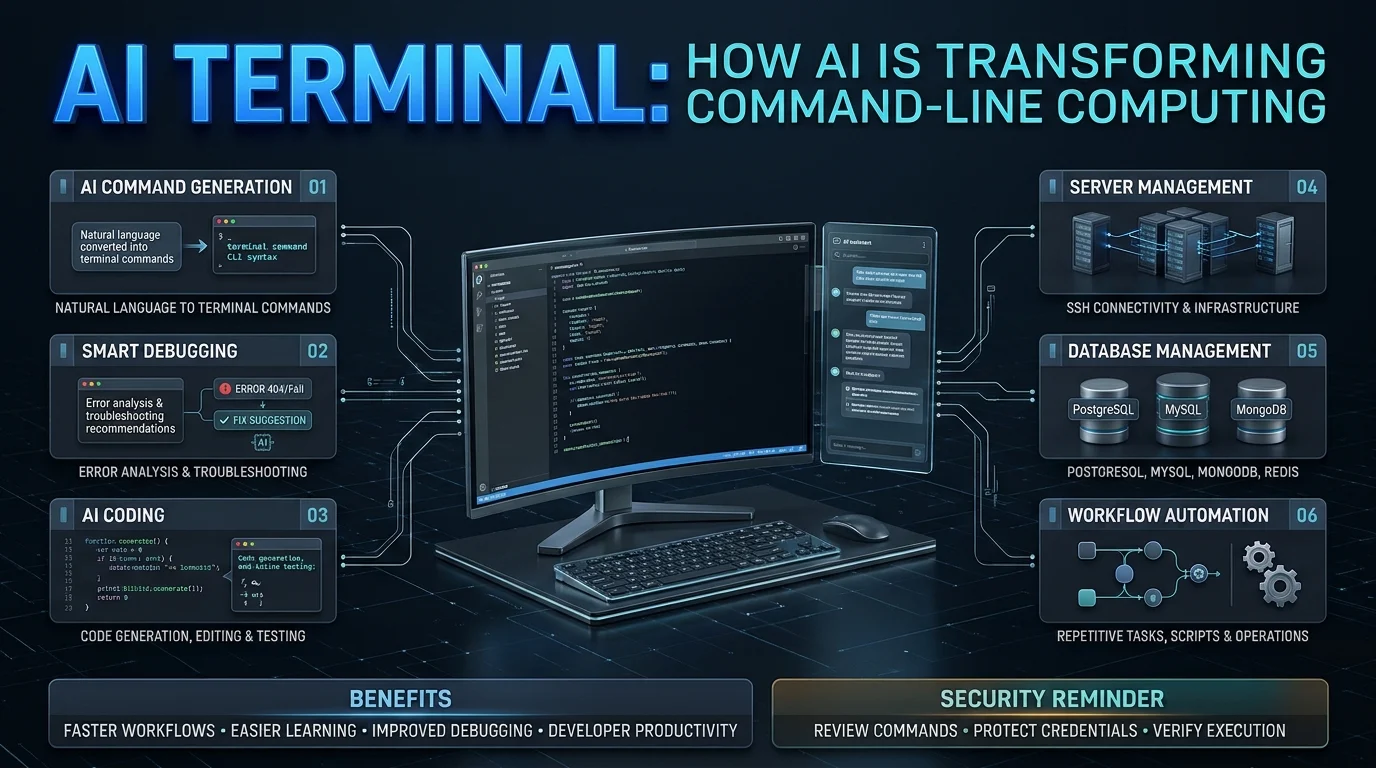
Artificial intelligence is changing how people interact with computers, and the traditional command-line environment is becoming part of that transformation. Developers and IT professionals no longer have to rely exclusively on memorized commands, lengthy documentation, and manual troubleshooting. AI-powered terminal tools are introducing natural language assistance, automated coding support, and more accessible ways to manage technical workflows.
AI Terminal generally refers to a terminal environment enhanced with artificial intelligence. It can help users generate commands, understand errors, write code, manage servers, and automate repetitive development tasks. Depending on the product, these capabilities may be integrated into a traditional terminal, provided through an AI assistant, or delivered by an autonomous coding agent.
There is also a specifically named application called AI Terminal that combines SSH access, database management, service monitoring, deployment tools, and AI assistance in one application. Apps on Google Play+1
This guide explains how AI Terminal works, its main features, practical applications, benefits, limitations, and security considerations.
What Is AI Terminal?
AI Terminal is an AI-enhanced computing environment that helps users interact with operating systems, development tools, servers, and databases through conventional commands and natural language instructions.
A traditional terminal requires users to understand command syntax and manually enter instructions. An AI-powered terminal adds an intelligent assistance layer that can interpret requests, suggest commands, explain technical errors, and, when authorized, execute actions.
For example, instead of searching for the correct command to inspect disk usage, a user might ask:
Show me which directories are using the most storage.
The AI assistant can translate that request into an appropriate shell command and explain its output.
More advanced AI terminal agents can also examine project files, modify code, execute tests, and help resolve errors.
Understanding the AI Terminal Application
The application listed on Google Play under the name AI Terminal is a more specific product. Its published description identifies three central areas of functionality:
- SSH terminal access for remote server management.
- Database tools for PostgreSQL, MySQL, MongoDB, and Redis.
- An AI assistant supporting providers including Claude, OpenAI, Gemini, OpenRouter, and OpenCode Zen.
It also advertises service monitoring, deployment tools, reusable command snippets, and device-based credential storage. Apps on Google Play
It is important not to assume that every AI terminal product includes all these features. Capabilities depend on the particular application, its integrations, and the AI model being used.
How Does AI Terminal Work?
AI Terminal combines a conventional command-line interface with an AI model and supporting tools. These components work together to interpret user instructions and assist with technical operations.
I Mass-Deleted My IDE Extensions and Moved Entirely Into the Terminal. Here’s Everything I Learned About Claude Code in 90 Days. | by Murat Aslan | Mar, 2026 | Medium
medium.com
1. Natural Language Processing
The process begins when a user enters a question or instruction in everyday language.
The AI model analyzes the request, identifies its intended purpose, and determines what type of command or assistance is required.
For example, a user might ask the assistant to explain why a web server is returning an error. The model can interpret the question and suggest relevant diagnostic commands.
2. Command Generation
After understanding the request, the AI assistant generates a suitable command or sequence of commands.
It may explain what each command does, identify possible risks, and suggest alternative approaches.
This reduces the need to remember complex command syntax, particularly for beginners.
3. Execution and Tool Integration
Depending on the product and permission settings, the AI may simply display a suggested command or execute it through an integrated terminal.
More advanced agents can interact with files, development environments, databases, and other connected tools.
Users should understand whether commands are running locally or on a remote server before approving execution.
4. Output Analysis
After execution, the terminal displays the results.
The AI assistant can interpret the output, identify potential errors, and recommend additional troubleshooting steps.
This creates an iterative workflow in which the user can ask follow-up questions until the problem is resolved.
5. Verification and Improvement
A reliable AI terminal workflow should include verification.
For development tasks, this might involve running tests, reviewing code changes, checking logs, and confirming that the requested operation worked correctly.
AI-generated commands are suggestions or automated actions, not guarantees of correctness.
Key Features of AI Terminal
AI Terminal capabilities vary by product, but several features define the broader technology category.
Introducing Hermes IDE: An AI-Native Terminal That Actually Understands Your Projects | by Gabriel Anhaia | Dev Warlocks | Mar, 2026 | Medium
medium.com
AI-Powered Command Generation
One of the most useful features is the ability to translate natural language into command-line instructions.
Users can describe their objectives without memorizing every command or parameter.
This can make everyday operations more accessible while helping experienced developers complete repetitive tasks faster.
Intelligent Error Detection and Debugging
Technical errors are a regular part of software development and system administration.
An AI assistant can analyze error messages, explain potential causes, and recommend troubleshooting steps.
For example, it may help investigate:
- Missing software dependencies.
- Incorrect file permissions.
- Application configuration problems.
- Database connection failures.
- Network connectivity issues.
- Programming errors.
The quality of its recommendations depends on the context and information supplied.
AI-Assisted Coding
Some terminal AI agents can work directly with software projects.
Depending on their permissions and capabilities, they may:
- Generate code.
- Modify existing files.
- Explain unfamiliar functions.
- Identify potential bugs.
- Run development tests.
- Suggest improvements.
- Help create documentation.
These capabilities make AI terminal agents useful for developers working on larger codebases.
SSH and Remote Server Management
SSH functionality allows users to connect securely to remote computers and servers.
The specifically named AI Terminal application advertises password-based and key-based SSH authentication, saved sessions, and jump-host support. Apps on Google Play
This can help developers and system administrators manage remote infrastructure from a unified interface.
Database Management
Some AI terminal applications integrate database clients alongside traditional shell access.
The named AI Terminal app lists support for:
- PostgreSQL
- MySQL
- MongoDB
- Redis
These integrations allow users to inspect data, browse tables, and execute database queries within the application. Apps on Google Play
Workflow Automation
AI terminal tools can help automate repetitive technical operations.
Examples include generating scripts, organizing project files, checking application logs, and preparing deployment commands.
More advanced agentic systems can complete multi-step tasks by combining planning, execution, and verification.
Multiple AI Model Integrations
Certain AI terminal products allow users to select different AI providers instead of relying on a single model.
For example, the Google Play listing for AI Terminal identifies Claude, OpenAI, Gemini, OpenRouter, and OpenCode Zen as supported options. Apps on Google Play
This flexibility can help users choose models based on their preferred provider, availability, and usage costs.
Benefits of Using AI Terminal
AI-powered terminal environments offer several practical advantages for developers and technical teams.
1. Improved Productivity
AI assistance can reduce the time spent searching documentation, remembering commands, and troubleshooting routine problems.
Developers can describe their objectives and receive relevant technical guidance within the same working environment.
2. Easier Command-Line Learning
Traditional terminals can be intimidating for beginners.
AI assistance provides explanations of commands, parameters, errors, and system operations. This can make the learning process more interactive.
However, understanding the commands remains important, especially when working with important files or production infrastructure.
3. Faster Troubleshooting
AI assistants can interpret technical output and suggest possible solutions.
Rather than manually searching through multiple documentation pages, users can receive contextual explanations and investigate problems systematically.
4. Better Development Workflows
AI coding agents can help with repetitive programming activities, code modifications, and test execution.
This allows developers to focus more attention on software architecture, product decisions, and complex engineering problems.
5. Centralized Technical Operations
Applications combining SSH, database access, monitoring, and AI assistance can reduce the need to switch between multiple interfaces.
For developers managing different environments, this can create a more organized workflow.
6. Greater Accessibility
Natural language interaction can help people who are still learning command-line tools.
It does not eliminate the need for technical knowledge, but it can reduce the initial learning barrier.
Popular AI Terminal Tools and Alternatives
AI Terminal is not one universal technology or a single standardized product. Several applications provide different forms of AI-assisted command-line functionality.
Gemini CLI完全解説!100万トークン対応の最強AI開発ツール|なごやん
note.com
| Tool | Main purpose | Best suited for |
|---|---|---|
| Warp | AI-enhanced desktop terminal | Developers seeking an integrated terminal experience |
| Claude Code | Agentic coding through the terminal | Complex software development |
| OpenAI Codex CLI | AI-assisted coding and command-line tasks | Developers using OpenAI models |
| Aider | AI pair programming | Git-based code editing |
| OpenCode | Terminal-native AI coding agent | Developers seeking model flexibility |
| Goose | Extensible AI agent workflows | General technical automation |
| AI Terminal app | SSH, database access, deployment, and AI assistance | Server administrators and developers |
These tools serve overlapping but different purposes. A terminal application provides the environment, while an AI coding agent provides additional intelligence and task-execution capabilities. Some products combine both. TermAI+1
Who Should Use AI Terminal?
AI Terminal can be useful for different types of technical users.
Software Developers
Developers can use AI terminal tools to generate code, understand unfamiliar projects, troubleshoot errors, and automate repetitive programming activities.
System Administrators
System administrators can benefit from AI-assisted command generation, server diagnostics, SSH workflows, and infrastructure management.
DevOps Engineers
DevOps professionals may use terminal agents to assist with deployment scripts, log analysis, configuration troubleshooting, and development pipelines.
Database Administrators
Integrated database clients can help users inspect records, execute queries, and manage database operations.
AI-generated database commands should always be reviewed before execution.
Students and Beginners
Students learning Linux, programming, networking, and system administration can use AI assistance to understand unfamiliar commands.
It is particularly useful as a learning companion when users ask the AI to explain commands instead of simply copying them.
How to Use AI Terminal
Getting started depends on the product you choose. However, most AI terminal workflows follow a similar process.
Claude Code: More Than a Programming Assistant — It’s Your Universal AI Agent | by Pan YANG | Medium
medium.com
Step 1: Choose an AI terminal tool.
Decide whether you need an integrated desktop terminal, a coding agent, an SSH application, or a database management environment.
Step 2: Install the application.
Download the software from its official website or an authorized application store. Check operating system compatibility and installation requirements.
Step 3: Configure AI access.
Depending on the product, connect an AI provider through an API key, an eligible subscription, or an available built-in authentication method.
Step 4: Provide a clear instruction.
Describe the task and include relevant technical context.
For example:
Explain why my Node.js application is failing to connect to PostgreSQL. Start with read-only diagnostic commands.
Step 5: Review suggested commands.
Check the command, its arguments, and the target environment before allowing execution.
Step 6: Verify the results.
Review the terminal output, inspect modified files, and run relevant tests to confirm the result.
Is AI Terminal Safe to Use?
AI terminal tools can be useful, but they introduce security considerations because some applications can access files, execute commands, connect to servers, or interact with databases.
An incorrect command may delete files, expose sensitive information, modify configurations, or disrupt a production environment.
The following practices can reduce these risks:
- Review commands before execution.
- Avoid sharing passwords, API keys, and private credentials in prompts.
- Use least-privilege access wherever possible.
- Keep backups of important files and databases.
- Use sandboxed environments for unfamiliar projects.
- Check file modifications before accepting AI-generated changes.
- Verify SSH host identities before connecting.
- Require additional approval for destructive operations.
The named AI Terminal application states that SSH passwords, private keys, database passwords, and AI API keys are stored in device hardware-backed secure storage rather than uploaded to its servers. It also advertises optional end-to-end encrypted secret synchronization. These are developer-provided product claims, not an independent security audit. Google Play separately indicates that the app may collect personal information and app activity and may share app activity with third parties. Apps on Google Play
Therefore, users should read the privacy policy and assess the security controls before connecting sensitive infrastructure.
Limitations of AI Terminal
Despite its advantages, AI Terminal is not a replacement for technical expertise.
Incorrect AI-Generated Commands
AI models can generate commands that look correct but contain errors or unsafe parameters.
Users should understand the consequences before executing them.
Dependence on AI Providers
Cloud-based AI assistance may require an internet connection, provider authentication, and paid API usage.
Service availability and usage limits can affect productivity.
Security and Permission Risks
An AI agent with extensive filesystem or server permissions can cause significant damage if it misunderstands an instruction.
Restricted permissions and human approval are important safeguards.
Learning Curve
Although natural language assistance simplifies some operations, users still need basic knowledge of operating systems, shells, networking, and software development.
Variable Product Capabilities
Not every AI terminal supports the same operating systems, programming languages, database integrations, or AI providers.
Users should check the official documentation before selecting a solution.
AI Terminal vs. Traditional Terminal
The main difference is the addition of artificial intelligence assistance.
| Feature | Traditional terminal | AI-powered terminal |
|---|---|---|
| Command input | Manual | Manual and natural language assistance |
| Command generation | User-created | AI-assisted |
| Error explanation | Manual research | AI-supported analysis |
| Coding assistance | External tools required | May be integrated |
| Automation | Scripts and commands | Scripts and AI agents |
| Learning support | Documentation | Interactive explanations |
| Execution control | User-controlled commands | Depends on product permissions |
A traditional terminal remains powerful and reliable. AI assistance adds another layer of convenience, but it does not make every operation automatically safer or more accurate.
The Future of AI Terminal Technology
AI terminal environments are likely to become more capable as language models, tool integrations, and agentic systems improve.
One important development is the transition from simple command suggestions to multi-step task execution.
Instead of asking an AI assistant to generate one command, users may increasingly delegate broader objectives such as investigating an application failure, updating a project dependency, or preparing a deployment workflow.
Other developments include:
- Better integration with development environments.
- More capable autonomous coding agents.
- Improved support for local AI models.
- Stronger permission and sandbox controls.
- More sophisticated server and database integrations.
- Better collaboration between human developers and AI agents.
However, increased autonomy also creates greater responsibility. Reliable execution, transparent permissions, audit trails, and human oversight will remain essential.
FAQs
1. What is AI Terminal used for?
AI Terminal is used for AI-assisted command-line operations, coding, debugging, server management, and technical automation. Depending on the application, it can also provide SSH connectivity and database management.
2. Is AI Terminal suitable for beginners?
Yes. Beginners can use AI terminal assistants to understand commands, interpret error messages, and learn programming concepts. However, they should review commands before executing them.
3. Can AI Terminal write code?
Yes. AI coding agents that operate through a terminal can generate code, modify existing files, troubleshoot errors, and run tests. Their capabilities depend on the selected AI agent and model.
4. Does AI Terminal support SSH connections?
The specifically named AI Terminal application advertises SSH connectivity with password-based and key-based authentication. It also supports saved sessions and jump hosts. Apps on Google Play
5. Is AI Terminal free?
Pricing depends on the product. The specifically named AI Terminal application describes a bring-your-own-key model, allowing users to connect supported AI providers. Its Google Play listing does not provide a complete subscription price list. Users should check the current application listing and provider charges.
6. Which AI models can AI Terminal use?
The named application lists Claude, OpenAI, Gemini, OpenRouter, and OpenCode Zen integrations. Other AI terminal products may support different models and providers. Apps on Google Play
7. Can AI Terminal work without an internet connection?
Some AI terminal setups can use locally hosted models, but cloud-based AI providers generally require internet connectivity. Offline functionality depends on the selected model, terminal application, and supporting tools.
8. Is AI Terminal better than a traditional terminal?
AI Terminal can make command-line work easier by providing natural language assistance, command suggestions, and automated workflows. Traditional terminals remain useful for users who prefer direct control and predictable command execution.
9. Can AI Terminal manage databases?
Certain AI terminal applications include database management functionality. The named AI Terminal app advertises integrations for PostgreSQL, MySQL, MongoDB, and Redis. Apps on Google Play
10. Is AI Terminal useful for professional developers?
Yes. Developers can use AI terminal environments for code generation, debugging, testing, repository exploration, and repetitive development tasks. Professional users should still review changes and verify results before deploying them.
Conclusion
AI Terminal represents an important development in the evolution of command-line computing. By combining traditional terminal functionality with artificial intelligence, these tools make technical workflows more accessible, interactive, and potentially efficient.
From natural language command generation and AI-assisted debugging to coding automation, SSH connectivity, and database management, AI-powered terminal environments offer practical capabilities for developers, system administrators, and technology professionals.
However, choosing the right solution requires understanding its features, supported AI models, pricing structure, privacy practices, and execution permissions. AI-generated commands should never be treated as automatically correct, particularly when working with production systems or sensitive information.
Ultimately, AI Terminal is best viewed as an intelligent assistant for technical work rather than a replacement for human expertise. When combined with proper security controls and technical oversight, it can become a valuable part of modern development and infrastructure management.